 The Hosting Lexicon
Regions and availability zones
The short version
- A region is a separate geographic area where a cloud company runs its servers.
- An availability zone is an isolated location inside a region.
- You choose a region to be near visitors or to meet legal rules. You use more than one zone to survive a failure.
Region
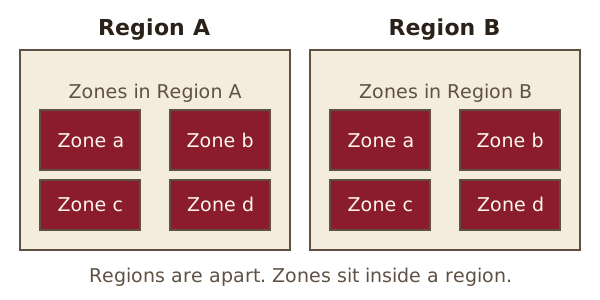
A region is a separate geographic area.[1] Think of a country or a large part of one. A cloud company may run many regions around the world.
Each region is designed to be isolated from the other regions.[1] A problem in one is not meant to spread to the next.
Why the choice of region matters
Amazon's documentation gives two reasons to pick a region. One is to put your servers close to specific customers. The other is to meet legal or other requirements that you have.[1]
Closer servers usually mean less delay. Our latency entry explains why. Other providers use their own names and menus, so check your host's documentation for how it words this.
Availability zone
An availability zone is an isolated location within a region.[1] Each one is made of one or more separate data centres. They have their own power, networking and connections.[2]
The zones in a region are separate, but they all sit inside the same region.
One provider writes a zone's name as the region code plus a letter, such as us-east-1a.[1] Other providers may name theirs differently.
Why use more than one zone?
If all your servers sit in one location and it fails, none of your servers work. If you launch them in several zones, you are protected from the failure of a single location in the region.[1]
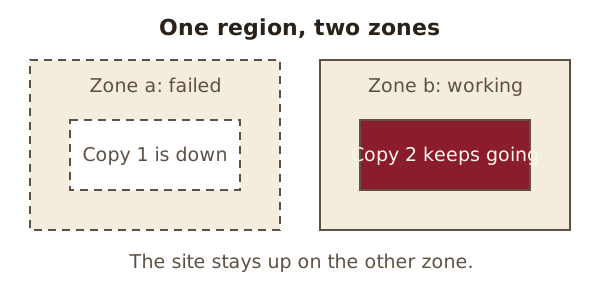
This is the same idea as redundancy, applied to whole locations. It can also help uptime.
Does a small site need this?
Often not. A basic shared hosting plan hides these choices from you. Zones and regions show up mostly with cloud hosting, where you choose where your servers run.
Origin: the word "region" here means a place on the map, not a part of the internet.
See also: Data centre · Redundancy · Content delivery network (CDN).
Sources
- Regions and Zones - Amazon Elastic Compute Cloud, Amazon Web Services documentation (accessed 2026-10-30)
- Availability Zones - AWS Fault Isolation Boundaries, Amazon Web Services documentation (accessed 2026-10-30)