 The Hosting Lexicon
Data centre terms
The short version
- A data centre is a building full of servers. Web hosts keep their servers there, or rent space in one.
- Power, cooling, fire safety and security are the main things it must provide.[1]
- Most of the jargon is about one idea: no single failure should switch your site off.
Data centre
A data centre is a room, building or facility for storing, managing and sharing data.[1]
Your website's files sit on a server. That server sits in a data centre. A host might own the building, or rent space in one. Renting space is called colocation.
The key design jobs are power, temperature and humidity control, cabling, fire safety and security.[1] Each term below is one of those jobs.
See also: Dedicated server · Cloud hosting · History of web hosting.
Rack
A rack is a standard frame that holds server equipment.[1]
Think of a tall bookcase. Each server slides in like a book. Racks keep the equipment tidy and leave room for cables and cooling.
Origin: the early computer rooms of the 1940s already used standard racks to mount equipment.[1]
See also: Colocation.
Redundancy
Redundancy means keeping a spare of something important, so one failure doesn't stop the service.
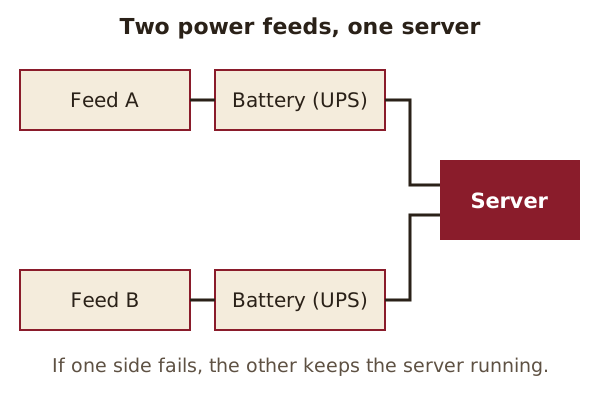
In a data centre, this applies to power. To prevent single points of failure, the electrical parts, backup systems included, usually have redundant copies.[1] A single point of failure is one part that takes everything down with it if it breaks.
Critical servers are often connected to both an A-side and a B-side power feed.[1] If feed A fails, feed B carries on.
See also: Uptime · Load balancing.
Uninterruptible power supply (UPS)
A UPS is a battery system that keeps equipment running when the mains power stops.
Backup power can include uninterruptible power supplies, battery banks, and diesel, gas turbine or gas engine generators.[1] Batteries cover the first moments. Generators can then take over for longer.
See also: Redundancy · Service level agreement (SLA).
Cooling
Cooling is how a data centre stops its equipment from overheating.
Keeping temperature and humidity at suitable levels is critical to preventing equipment damage from overheating.[1] Typical methods include air conditioning and indirect cooling.[1]
Cooling costs money too. Power is the largest recurring cost to the user of a data center.[1]
See also: Rack.
Aisle containment
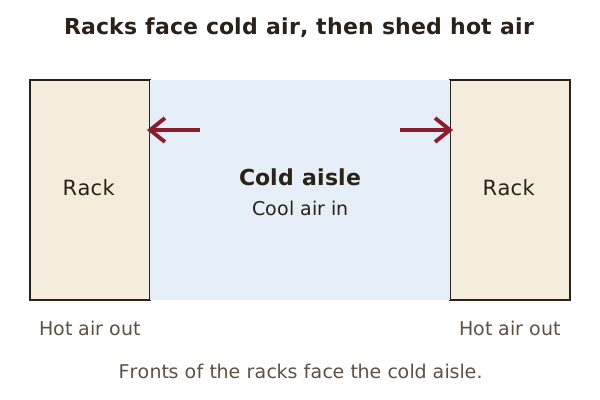
Aisle containment is a way of arranging racks so cold and hot air don't mix.
In cold aisle containment, the rear of the racks stays exposed. The fronts of the servers are enclosed with doors and covers.[1] The diagram above shows the idea in a simplified form.
See also: Cooling.
Fire protection
Fire protection means the detectors and systems that warn about and put out a fire.
Smoke detectors are usually installed to give early warning of a fire.[1] Fire safety is one of the key design elements of a data centre.[1]
See also: Backup.
Sources
- Data center, Wikipedia (accessed 2026-10-23)