 The Hosting Lexicon
Static and dynamic sites
The short version
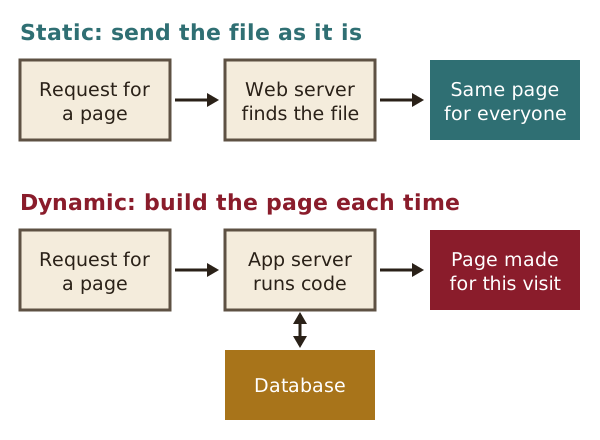
- A static site is a set of ready-made files. The server sends them exactly as they are.
- A dynamic site builds each page when someone asks for it, often from a database.
- Static sites are simpler and harder to attack. Dynamic sites can do more, such as logins and shopping carts.
- Static site generators and serverless functions sit between the two.
Static site
A static site is made of pages that are sent to the browser exactly as they are stored.[1]
Every visitor sees the same page.[1] It is like a printed leaflet: the words are fixed until someone prints a new one.
A static site needs only a web server, which sends the files as they are.[2] That is why static sites are the easiest kind to set up.[2]
For example, a small museum's opening hours page could be one HTML file. It only changes when the hours change.
See also: Static site generator · Content delivery network (CDN).
Dynamic site
A dynamic site builds its pages at the moment someone asks for them.[3]
The server works on the content first, or creates it from a database on the spot.[2] So two visitors can see different pages at the same address. A shop, for example, shows each shopper their own basket.
Big sites often work this way. They use a few page templates and one very large database, instead of thousands of separate files.[2]
See also: Application server · Database · PHP.
Application server
An application server is the software that builds dynamic pages, usually by running code and reading from a database.[2]
It works behind the web server, which passes the result on.[2] For example, it might fill a page template with the latest news stories from a database.[2] The web server then sends the finished page out.
See also: Dynamic site · Web server.
Common Gateway Interface (CGI)
CGI is an early, standard way for a web server to run another program to answer a request.[4]
A typical use was a web form. When someone sent the form, the server ran a small program, called a CGI script, to handle it.[4]
Origin: the CGI rules were written in 1993 by a team at NCSA.[4] CGI was the first common way to make a web page interactive.[4]
See also: Dynamic site · PHP.
Content management system (CMS)
A CMS is software for creating, editing and publishing content, such as the pages of a website.[5]
You write in a simple editor, and the CMS turns your words into web pages. You don't need to touch code. Many hosting packages include a CMS for this reason.[6]
WordPress is one example. Its posts are kept in a database.[7]
See also: Dynamic site · Managed hosting.
Static site generator
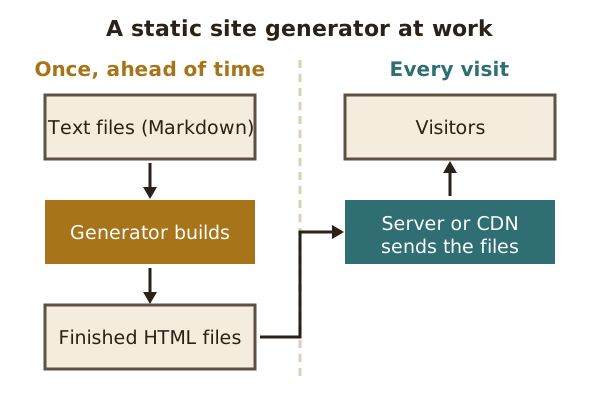
A static site generator is a program that turns source files into a ready-made static website.[8]
Authors write in a simple format, such as Markdown.[8] The generator then builds every page once, ahead of time. The finished files go on the server.
That gives a site the speed of static pages, with some of the ease of a CMS. Generated sites are fast and simple to put online.[8] With less software on the server, there is also less for attackers to break into.[9]
See also: Static site · Content management system (CMS).
Serverless
Serverless is a way of running code in the cloud where the customer supplies only the code, not the servers.[10]
There are still servers, of course. The provider sets them up and runs them.[10] One common form is function as a service: a small piece of code that runs only when it is called.[10]
For example, a static site could use one small function to handle its contact form. The rest of the site stays as plain files.
See also: Cloud hosting · Static site.
Sources
- Static web page, Wikipedia (accessed 2026-10-18)
- What is a web server?, MDN Web Docs (accessed 2026-10-18)
- Dynamic web page, Wikipedia (accessed 2026-10-18)
- Common Gateway Interface, Wikipedia (accessed 2026-10-18)
- Content management system, Wikipedia (accessed 2026-10-18)
- Web hosting service, Wikipedia (accessed 2026-10-18)
- Backups (WordPress Advanced Administration Handbook), WordPress.org (accessed 2026-10-18)
- Static site generator (SSG) (MDN Glossary), MDN Web Docs (accessed 2026-10-18)
- Static site generator, Wikipedia (accessed 2026-10-18)
- Serverless computing, Wikipedia (accessed 2026-10-18)